Wireless Collar-Clip Microphone: A Buyer's Guide to Clear, Hands-Free Audio
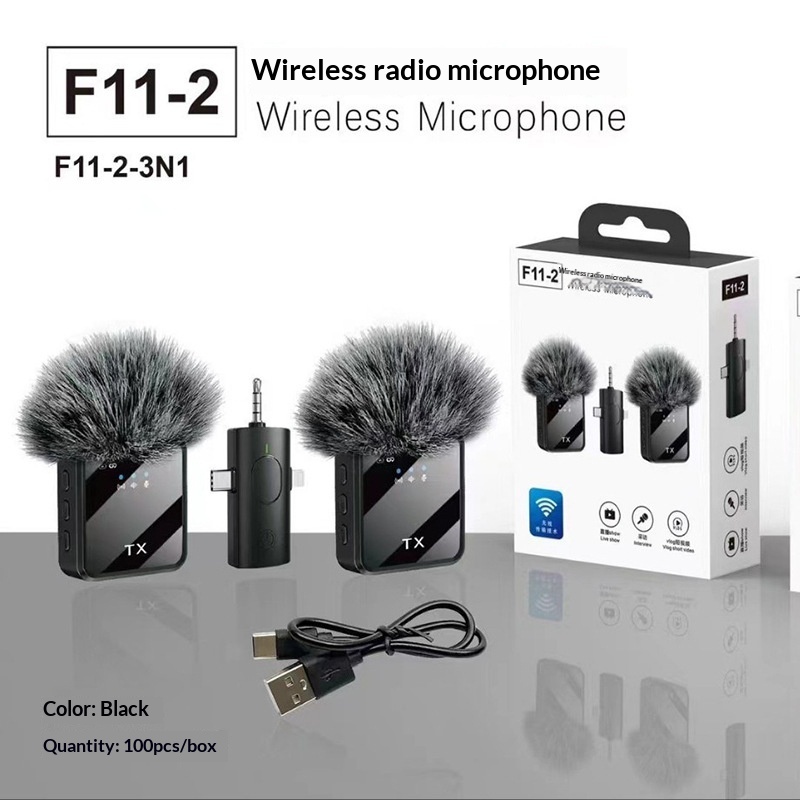 Wireless Collar-clip Microphone (F11)$9.99Shop →
A wireless collar-clip microphone, often called a lavalier or lapel mic, is a tiny microphone you attach to your shirt that sends audio to a small receiver without any cable running to your camera or phone. It exists to solve one stubborn problem: the microphone built into your phone or camera is usually too far from your mouth, so it picks up the room more than your voice. Move the mic to your collar and your voice instantly sounds closer, fuller, and easier to understand.
Who actually benefits from one
If you record yourself talking — to a camera, a phone, or a webcam — this is one of the highest-impact upgrades you can make. Common users include:
- Content creators filming talking-head videos, vlogs, or tutorials.
- Presenters and teachers who move around while speaking.
- Interviewers who need to capture a single subject cleanly.
- Remote workers who want clearer audio on calls without a headset.
How to choose the right one
Start with the connector. Make sure the receiver matches your device — phones with a USB-C or Lightning port, or cameras and laptops that take a 3.5mm input, each need a compatible plug or adapter. Next, think about range and how far you'll typically stand from your recording device; for desk and close-up filming, generous range matters far less than reliable connection. Battery life is worth checking if you record long sessions, since the transmitter and receiver both run on internal charge. Finally, look at the clip itself — a firm, well-designed clip holds steady on thin fabric and resists the clothing rustle that ruins otherwise good takes.
Getting clean recordings
Placement does most of the work. Clip the mic about a hand's width below your chin, centered on your chest, and tuck any slack so the capsule doesn't brush against fabric. Avoid placing it under a necklace, zipper, or scarf that can tap the housing. Always run a short test recording and listen back with headphones before the real take — it's the fastest way to catch wind, handling noise, or a connection that didn't pair.
Care and storage
Keep the foam windscreen on for outdoor or breezy shots, and store the transmitter, receiver, and clip together in a small pouch so nothing wanders off. Charge the units fully before a shoot rather than mid-session, and switch them off when you're done to preserve battery health. Treated gently, a clip mic is a small tool that quietly raises the quality of everything you record.
FAQ
- Will a wireless collar-clip mic work with my phone?
- It depends on the receiver's connector. Check whether yours plugs into USB-C, Lightning, or a 3.5mm jack and confirm it matches your phone's port, or use the correct adapter.
- Why does my recording have rustling noises?
- That's usually the clip or cable rubbing against clothing. Reposition the mic away from zippers and collars, secure any slack, and keep the foam windscreen on.
- Do I need to charge it before each use?
- These mics run on internal batteries, so it's best to charge the transmitter and receiver fully before a session and turn them off afterward to save power.